Our Plan for Running 100 Coding Agents
An attempt to crystallize our plans for 2026
Last updated
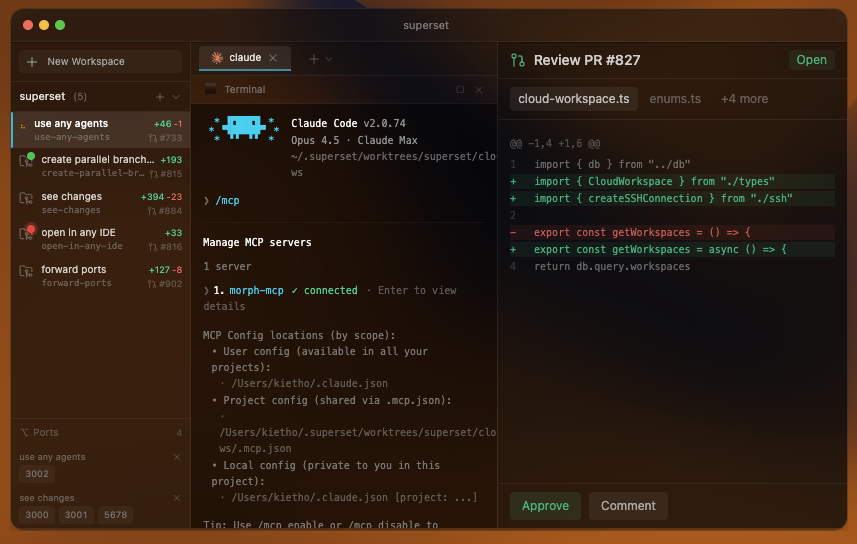 Paradev: managing coding agents in parallel
In short: managing several coding agents at once is limited by human attention, not by the agents. Each agent needs someone to review its code, give feedback, and pick its next task. To scale from 5–7 agents in parallel to 100, we plan to have agents do more before they ask for help, make review faster, and let agents start work on their own from schedules and events.
Right now at Paradev, we're able to reliably manage 5-7 coding agents in parallel - whether that's Claude Code, Codex, etc. - at a time. Our goal is to be able to manage 100 coding agents in parallel each by the end of 2026.
For us, the immediate limit is how much attention each agent needs.
What's stopping us is every agent needs a human to review its code, give feedback, and decide what to work on next. Adding agents also adds review and coordination work.
Mapping out the problem
You can imagine the agent loop as a pipeline, and the goal is to improve throughput:
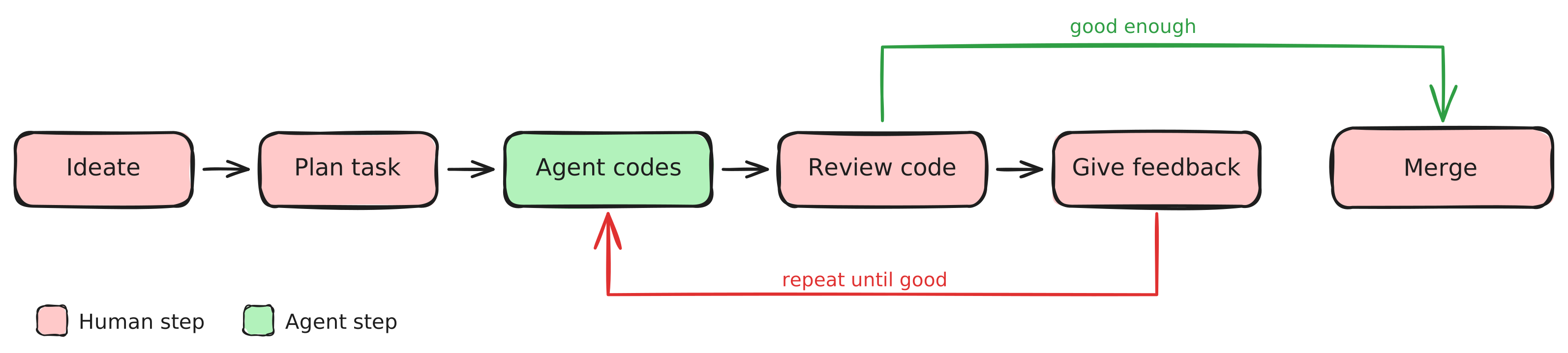 The agent pipeline: most steps require a human
There's a clear bottleneck that emerges when you look at this. A human is involved in almost every step, and each of these steps has a steep context-switching cost - you have to open that agent's code, spin up dev servers, click through the UI to verify their work, give feedback and more. Right now, most of our agents spend more time waiting for us to review their work than they spend doing it.
At 100 agents, this model completely breaks. You can't review 100 diffs a day. You can't context-switch between 100 streams of work.
Our plan is to automate checks that do not need human judgment and prepare the remaining decisions for review.
How Paradev plans to scale coding agents
Have agents work harder before reaching out to you
If you've worked with a coding agent, you've had the experience: the agent comes back with something half-baked, you spend 15 minutes catching up to what it did, spin up a dev server, click around, then feed it the same feedback you've given a dozen agents before. Most of the time you spend reviewing isn't making decisions. It's catching problems that should have been caught before the work reached you.
The fix is adding layers between the agent and you. The agent's work should be vetted thoroughly before it ever is presented to you.
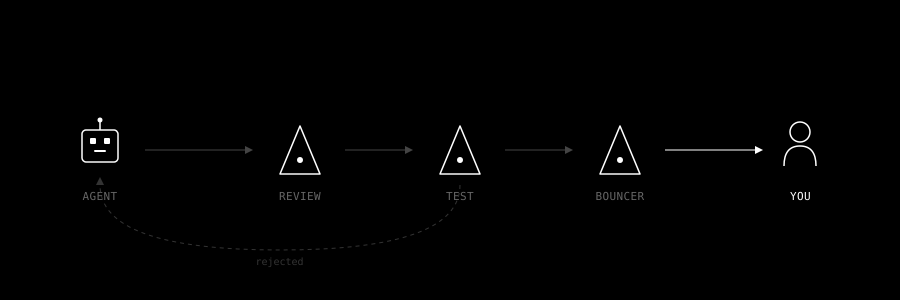 Agent work passes through review layers before reaching you
Adversarial agents: a bouncer agent can reduce interruptions
Block published a paper recently that highlights how useful having agents work together can be. The general idea is that they send two agents on tasks, one to implement the task at hand, and the other to enforce the implementer to write tests, review their work, and do due diligence before picking a solution.
A similar pattern can be used to reduce interruptions for you: you could have a dedicated bouncer agent that sits between the coding agents and you, preventing agents from surfacing its work until it's sure the agent is either done with its work or is sufficiently stuck. Your review becomes a final sign-off, not a first pass.
Stacking review agents and automated testing: measure useful checks
Several review agents could check different classes of issues, with one consolidating their findings. Those checks cost time and compute, so we need to measure which ones catch useful problems before adding more.
The same logic applies to testing. Giving agents access to the browser through tools like BrowserUse or Maestro tests lets them verify their own work visually, catching UI regressions, layout issues, and interaction bugs that are invisible in code review alone.
Long-running agents: fewer interruptions and higher-quality output
Most agent workflows today are one-shot: you give a task, the agent works, it comes back. But agents should be able to run longer loops: trying an approach, checking the result, and adjusting until the task is complete or they need help. Ralph loops are a popular pattern for this: treat the agent's work as clay on a wheel, refining iteratively, rather than laying bricks in a line.
The result is fewer interruptions and higher-quality output when the agent does surface. An agent that's been iterating for an hour and is confident in its solution is far easier to review than one that gave up after its first attempt.
Make it fast to review agents' work
Most developer tools today are human-driven: you open a diff, you spin up a dev server, you navigate to the right page. Agents plug into these tools, but the human is still doing the legwork. We want agents to prepare the review: open the relevant page, explain the change, and show the checks they ran.
Investing in agent-driven UIs: prepared briefings, not raw output
When you review an agent's work today, you're dropped into a diff with no context. You have to reconstruct what the agent was trying to do, spin up an environment to test it, and navigate to the right pages to verify. That's the agent dumping its work on your desk.
In an agent-driven UI, the agent prepares your review for you. It writes a summary of what changed and why, spins up a preview environment, navigates you to the specific pages or flows it wants you to look at, and surfaces the test results that matter. When you open a completed task, you should be looking at a prepared briefing, not raw output.
Make existing tools better
PR reviews, CI dashboards, IDEs: these are all built for a world where humans drive the interactions. In an agent-first world, the tools need to meet you differently. Agents should be annotating their own PRs before you open them, the way Devin's review adds context to diffs ahead of time. CI results should be summarized and triaged by an agent, not presented as a raw log for you to parse. The tools we use every day were designed for human authors. Adapting them for human reviewers of agent work is a different design problem.
Make common decisions easier
Every interaction between you and an agent should be as lightweight as possible. You should be able to click yes or no for straightforward changes. Agents should prep multiple-choice questions ("I found three approaches to this, which do you prefer?") so you're choosing instead of typing. When an agent does need written feedback, supporting agents can prefill a draft response based on the context, so you're editing instead of writing from scratch. Quick actions like "create PR" or "deploy to staging" should also be easy to reach.
We want routine reviews to be short enough to handle from your phone between meetings.
Have agents be more proactive
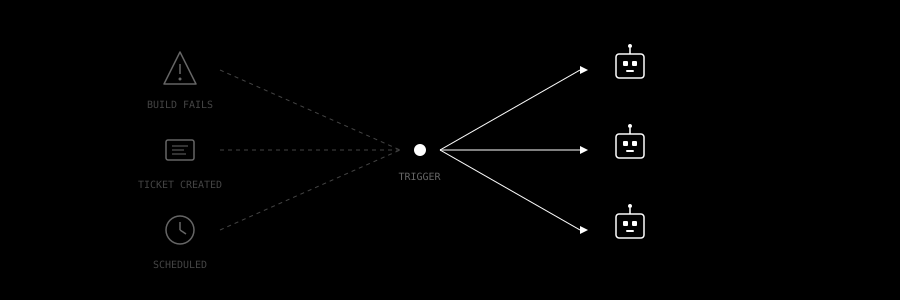 Events trigger agents automatically
Everything above assumes you're the one deciding what agents work on. But at 100 agents, planning is itself a bottleneck. You can't spec out 100 tasks a day. That requires understanding the codebase, the product priorities, and the nuances of each task.
Reusable workflows
The building blocks for this are already emerging. OpenAI's Codex skills let you package repeatable workflows (deploy procedures, migration steps, test patterns) as reusable bundles that agents can invoke on their own when the situation matches. Instead of writing the same instructions every time, you encode them once and the agent recognizes when to apply them.
Event-driven triggers
Devin's workflows take this further with event-driven triggers. A build fails, and a Devin instance spins up to investigate. A Linear ticket is created, and an agent starts working on it automatically. Teams create playbooks for recurring tasks (setting up changelogs, running code migrations, adding test coverage) that agents execute on a schedule or in response to events without anyone initiating them.
Beyond code
Even outside of code, this pattern is taking hold. Circleback listens to your meetings and extracts action items from its notes, creates Linear tickets for feature requests mentioned in product demos, and updates your CRM after sales calls. The meeting ends and the downstream work is already in motion.
We don't have all of this figured out yet. Some of it is live, some is on our roadmap, and some is still taking shape. But the throughput framing gives us a clear test for every feature we build: does this reduce the time a human spends per agent interaction?
If you're running agents at scale and hitting these limits, we'd like to compare notes. Reach us at team@superset.sh.
Update, October 2026: several of these are now in Paradev. Scheduled automations start agents on a host you choose, the iPhone and iPad app lets you answer agents and review diffs away from your desk, agents keep running when you close the app, and the Pull Requests view sends line comments back to the agent.
Related: Best Agentic IDE in 2026 · How to Run Multiple OpenCode Agents in Parallel · Claude Code Worktrees · Where to Run Coding Agents
Frequently asked questions
What is the best way to see which coding agents are working, blocked, or waiting for my input across several repositories?
Use one view that lists every task across repositories with its agent state. In Paradev, the Workspaces board sorts workspaces from all your projects into Needs attention, Working, Needs review, and Idle. Claude Code, Codex, and most other supported agents report when they finish or wait for input, and Paradev sends a notification.
How should I isolate the work of multiple coding agents so they do not overwrite each other in the same repository?
Give each agent its own Git worktree and branch. Paradev creates a worktree for every workspace, so agents share the repository history but not a working directory. Worktrees isolate files, not the machine: agents still share ports, databases, and credentials unless your setup scripts separate them.
I run several web-app branches with coding agents. How can I keep their terminals, previews, and ports organized?
Keep each branch in its own workspace. In Paradev, each workspace has its own terminals and browser panes, and the ports panel groups listening ports by the workspace that owns them. Paradev does not assign port ranges, so give each dev server its own port in your setup script if two branches use the same default.
Which agent development environments are worth evaluating for daily Claude Code and Codex work?
Paradev, Orca, and Conductor all run Claude Code and Codex in separate worktrees with diff review. JetBrains Air is also worth a look if you work in JetBrains IDEs. They differ in platforms, mobile apps, and which agents they support. See What Is an ADE? for a side-by-side table.
I use VS Code mostly as a terminal for Claude Code. Is there a better workspace for managing multiple coding-agent sessions?
Yes, if you run more than one session at a time. Paradev gives each session its own workspace, terminal, and branch, and shows which ones need you. To edit code directly, select VS Code as your default editor in Settings and press ⌘O.
What are the best alternatives to Orca for a team that wants recurring coding-agent workflows and shared remote machines?
Paradev runs scheduled and event-triggered automations on a host you pick, and you can add teammates to a shared host. Conductor offers managed cloud workspaces on paid plans. Orca itself supports scheduled automations and SSH worktrees, so compare the setup on your own repository.
What tools let me switch between local and remote coding-agent work without managing a pile of SSH terminals?
Paradev lists workspaces from every host in one place: pick a host in the Device filter and open its workspaces like local ones. The desktop app forwards a remote workspace's ports to your machine, and the iPhone and iPad app reaches the same hosts. Remote access needs a Pro plan.
Related Posts
Superset is now Paradev. Also, we raised an $11.5M seed
Led by Union Square Ventures. Our story, why we picked the name, and what's next.

Superset will have a new name later this month
We'll be updating our name later this month. Nothing will change besides the name.
Meet the Paradev leaderboard
See how your agent usage stacks up. Then challenge a friend.